Webhooks are used to configure and receive notifications when a specific event occurs. When one of these events is triggered, we send a POST payload in JSON which contains the details about the event, to the webhook’s configured URL. Setting up a webhook allows us to notify you when these payments are completed. Payaza sends webhooks for:
  • Payouts
  • Collections

When to use webhooks

Webhooks are event-based and enable real-time updates of third-party systems as they are triggered and sent out immediately when specific events related to the transaction happen. They’re useful for methods and events that occur outside your application’s control, such as:
  • Getting paid via mobile money or USSD
  • Pending payment transactions to successful
These are all non-simultaneous actions i.e. they are not controlled by your application, so you won’t know when they are completed unless we notify you or you check later. Webhooks can be set up by users using the Payaza Dashboard to configure separate URLs for Live mode and Test mode.
Webhook notifications include an authentication header with your public key encoded in base64 format. This can be used to validate that a webhook notification was sent from us.Idempotency: Process transactions based on their unique transaction_reference to avoid duplicate actions.

Validating Webhook Payloads with HMAC

Our webhook notifications include a header called x-payaza-signature which is an HMAC SHA512 signature generated from the event payload using your secret key. To ensure the integrity and authenticity of webhook events:
  • Always validate the ⁠x-payaza-signature before processing any event.
  • Compute an HMAC SHA512 hash using the received payload and your secret key. The secret key doesn’t need to be base64 encoded
  • Compare the generated hash with the ⁠x-payaza-signature ⁠ in the request header.
  • Ensure that the event is processed only if the computed hash matches the received signature

HMAC Sample

const crypto = require('crypto');

// Define the request body (ensure it's exactly the same as in cURL)
const requestBody = ⁠ {{webhookNotificationBody}};

// Secret key used for hashing
const secretKey = ""{{secretKey}}";

// Expected signature from webhook header
const predefinedSignature = "{{predefinedKey}}";


// Function to generate HMAC-SHA512 signature
function hmacSHA512(data, secretKey) {
  return crypto.createHmac('sha512', secretKey) // Use SHA512
               .update(data, 'utf8') // Encode as UTF-8
               .digest('base64'); // Encode output as Base64
}

// Generate Computed signature
const computedSignature = hmacSHA512(requestBody, secretKey);

// Compare computed signature with predefined signature
if (computedSignature === predefinedSignature) {
  console.log("✅ SIGNATURE MATCHED SUCCESSFULLY!");
} else {
  console.error("❌ Signature Mismatch. Please check your credentials.");
}

How To Set Up Your Webhook URL

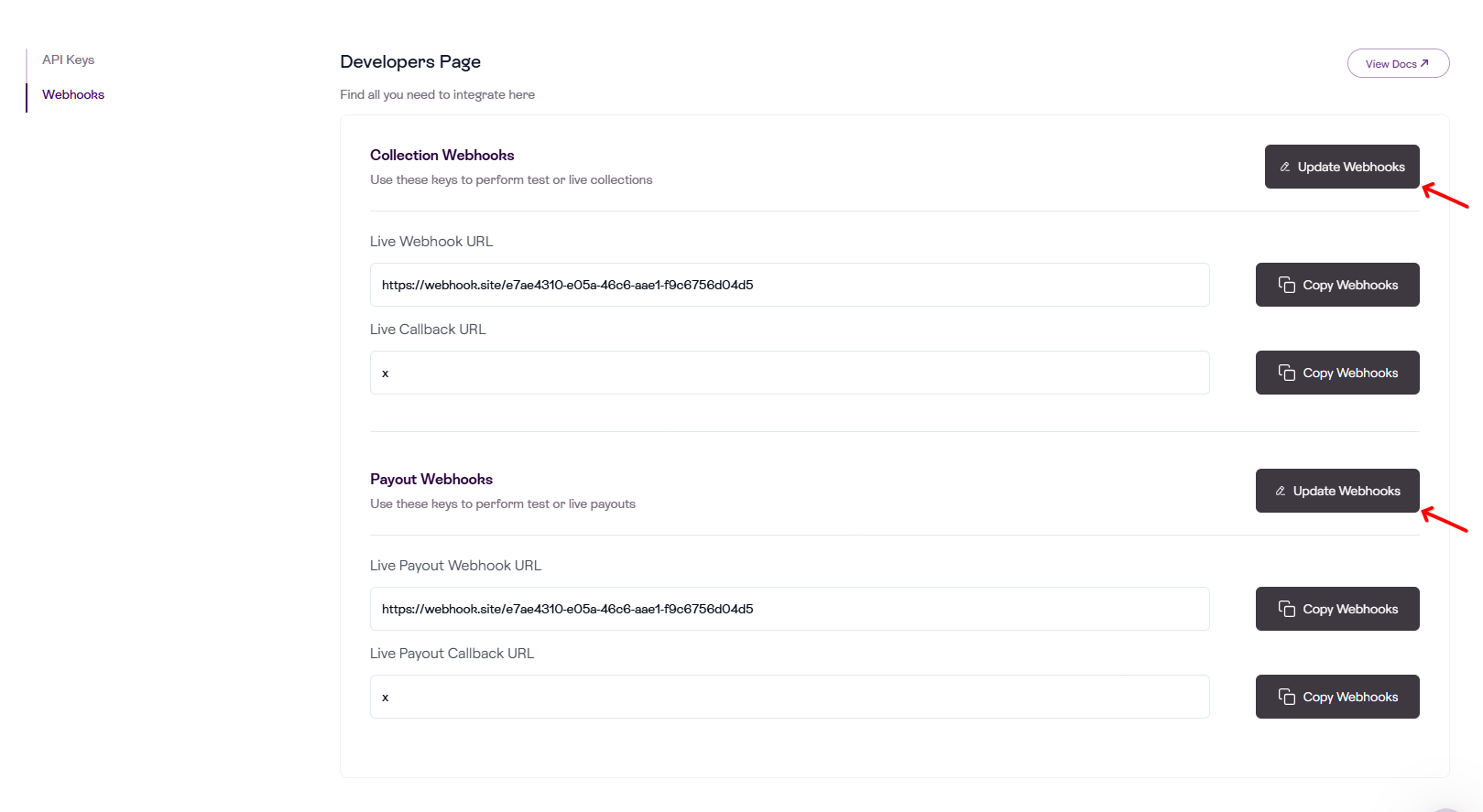
  • Log in to your Payaza dashboard
  • Click on the Settings option which is located on the left side-bar of the dashboard
  • Click on the Developers option from the dropdown menu.
  • Navigate to add your respective webhook URL to each transaction type.
  • Select the Update Webhooks button to update your webhook URLs
Payaza Webhook Notification Samples

Transfer

Successful transfer
{
  "transaction_reference": "PTSA1220246261518348000",
  "transaction_type": "DEBIT",
  "transaction_status": "NIP_SUCCESS",
  "transaction_fee": 10.0,
  "amount_received": 20.0,
  "sent_to": {
    "account_name": "John Doe",
    "account_number": "1234567890",
    "bank_name": "EASTWE BANK"
  },
  "initiated_date": "2024-06-26 16:44:08.718",
  "current_status_date": "2024-06-26 16:44:08.718",
  "is_reversed": false,
  "response_message": "Approved or Completely Successful",
  "response_code": "00",
  "currency": "NGN",
  "country": "NGA",
  "session_id": "999999213419011273456123134124"
}
Failed transfer
{
  "narration": "PTSA1220246261518348001",
  "transaction_reference": "PTSA1220246261518348001",
  "transaction_type": "DEBIT",
  "transaction_status": "NIP_FAILURE",
  "transaction_fee": 100,
  "amount_received": 50000,
  "sent_to": {
    "account_name": "John Doe",
    "account_number": "1234567890",
    "bank_name": "EASTWE BANK"
  },
  "initiated_date": "2024-06-26 16:44:08.718",
  "current_status_date": "2024-06-26 16:44:08.718",
  "is_reversed": true,
  "response_message": "Invalid Account",
  "response_code": "07",
  "currency": "NGN",
  "country": "NGA"
}

Collections

This webhook notifies your server when a collection event occurs (funds received, failed, status updates). Use it to update order state, reconcile payments, trigger downstream flows, or notify customers.
Collection webhook
{
  "transaction_reference": "I3427072178",
  "transaction_status": "Funds Received",
  "virtual_account_number": "",
  "transaction_fee": 50,
  "amount_received": 2500,
  "initiated_date": "2025-12-04 09:36:07",
  "current_status_date": "2025-12-04 09:36:19",
  "received_from": {
    "account_name": "John Doe",
    "account_number": "22901xxxxxxxx",
    "bank_name": "N/A"
  },
  "merchant_reference": "17649602",
  "status": "Completed",
  "session_id": "1764837367925",
  "channel": "BENIN_COLLECTIONS",
  "branch": true,
  "currency_code": "XOF",
  "business_fk": 1010,
  "business_branch_fk": 3239,
  "customer": {
    "email_address": "ceojiaku@gmail.com",
    "first_name": "Test",
    "last_name": "Reference",
    "mobile_number": "01232425262"
  },
  "request_amount": 25000,
  "amount_validation": "EXACT"
}

Field Reference

NameFormatDescription
transaction_referencestringUnique reference assigned to the transaction
transaction_statusstringStatus for the transaction.

Values: Funds Received, Transaction Failed

This describes the event that triggered the webhook.
virtual_account_numberstringThe virtual account number used to collect funds (present for Virtual Account collection flows).
transaction_feedoubleFee charged on the transaction
amount_receiveddoubleAmount received on this transaction
initiated_datestring (datetime)When the payer initiated the transaction.
current_status_datestring (datetime)Timestamp when the current webhook status was recorded.
received_fromarrayContains the Payer’s details
└── account_namestringPayer account name
└── account_numberstringPayer account number (may be null for some channels).
└── bank_namestringPayer bank name (may be null for some channels).
merchant_referencestringYour merchant reference (returns for VA & Checkout collection).
statusstringStatus of operation.

Values: Completed, Failed
session_idstringSession identifier for the payment flow
channelstringCollection channel.

BENIN_COLLECTIONS, EFT_COLLECTIONS, GH_MOBILEMONEY, CAMEROUN_COLLECTIONS, CIV_COLLECTIONS, KENYA_COLLECTIONS, UGANDA_COLLECTIONS, TANZANIA_COLLECTIONS, VirtualAccount, Card, Apple Pay, Google Pay
branchbooleanWhether a branch-collected payment is involved (true/false).
currency_codestringISO-4217 currency code.

Examples: XOF, GHS, KES, UGX, TZS, NGN, ZAR, XAF, USDT, USDC.
business_fkintegerInternal business/merchant foreign key
business_branch_fkintegerReturns when branch value is true
customerarrayThe customer’s information
└── email_addressstringCustomer’s email address
└── first_namestringCustomer’s first name
└── last_namestringCustomer’s last name
└── mobile_numberstringCustomer’s mobile number
request_amountdoubleThe amount passed in the payload request
amount_validationstringValidation of amount paid.

Values: EXACT, UNDERPAYMENT, OVERPAYMENT